Update AzureDevOps PR Status’ with Powershell

on Monday, May 25, 2020

AzureDevOps integrates third party CI pipeline components through a Pull Request Status API (example usage with node.js). The end goal of the status API is to allow you to integrate any number of 3rd party tooling into your pull request validation processes. Hopefully creating something that looks like this:

The Build succeeded link comes from the built-in Build Policy of Azure DevOps Branch Protection. But, for any other service, you’ll need to integrate it’s results using an external service. That’s how the Deploy succeeded link was created in the screenshot above.

There are examples on how to use the API for external services (like the node.js example), but I didn’t run across any examples for powershell. So, here’s a quick example.

The example code:

  • Load’s up some dlls from AzureDevOps .NET Client Libraries.
  • Loads up the VSTeam powershell module.
  • Signs into Azure DevOps using your Personal Access Token (both VSTeam and the .NET Client libraries need to be signed into separately).
  • Uses VSTeam to retrieve your Project’s internal Guid.
    • You can do this with the .NET libraries too. I just want to support the usage of the VSTeam module.
  • Uses the .NET Libraries to retrieve your Repositories internal Guid.
  • Creates a GitPullRequestStatus object and populates it with some information.
  • Uses CreatePullRequestStatusAsync to update the status.
    • The great part of CreatePullRequestStatusAsync is that the display will always show the most recently supplied status for an integration component. So, you don’t have to worry about “updating” the status. Just call CreatePullRequestStatusAsync repeatedly throughout your process to update the status.
Copying Build Task Groups with VSTeam

on Monday, December 17, 2018

So, we finally got around to updating our VSTS / Azure DevOps XAML based builds to Pipeline builds (the slick web based builds). This effort is just in time to get the functionality switched over before XAML builds get disabled on Azure DevOps. From Brian Harry’s Blog:

By the end of 2018, we will remove all support for XAML builds in all Team Services accounts.  By that time, all customers will need to have migrated to the newer build system version because their XAML builds can no longer be run.  We will continue to support the web based experience for viewing previously completed XAML based builds so that you have access to all your historical data.

The process of converting over these builds has been tremendously helped by the excellent open source VSTeam Powershell module (github). The creator of this module, DarqueWarrior (Donovan Brown), is amazingly talented and particular in his development practices. And, I love him for it.

Using his/his teams module as the underlying framework it was pretty quick and easy to build out a little additional functionality to copy Task Groups from one project to another. I would love to contribute the addition back to the project, but I just don’t have the time to put together the meticulous unit tests, follow the excellent coding standards, and integrate it into the underlying provider. I’m still in a race to get these builds converted before they get turned off.

So, here’s a quick gist of building some copying functionality on top of VSTeam:

VSTS moves to Azure DevOps

on Monday, November 26, 2018

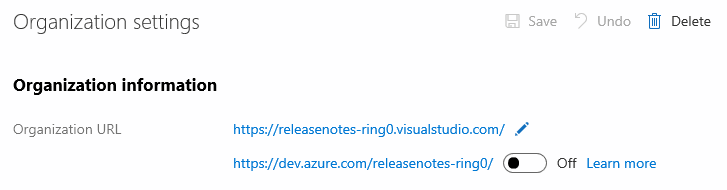
A few weeks ago Microsoft announced rebranding Visual Studio Team Services (VSTS) as Azure Dev Ops. One of the things that will be coming down the pike is a rebranding of the dns host name for VSTS.

Org URL setting

The change will take an organization url from https://{org}.visualstudio.com/ to https://dev.azure.com/{org}.

It’s not a big switch, but one that you need to plan for. We’re looking to do these things:

  • Update Firewall Rules
  • Update Build Agents
  • Update Your Visual Studio Source Control Settings
    • This is really simple and straight forward
  • Update Your Team Projects to use the new source control address (TFSVC)
    • We’re not yet on git, so this is one for the slow pokes

Here is a script to help find all your .sln files and update them to the new address.


Creative Commons License
This site uses Alex Gorbatchev's SyntaxHighlighter, and hosted by herdingcode.com's Jon Galloway.